Skip to main content
Click to view our Accessibility Statement or contact us with accessibility-related questions.
Chat
United States
Account
Log In
Log Out
Shop
Chat
United States
Account
Log In
Log Out
Shop
Printers &
Supplies
Printers
Home Office Printers
Office Laser Printers
Multifunction/All-in-One Printers
Digital Sheet-fed Printing Presses
All Printers
Product Finder
Printer Supplies
Supplies Finder
Metered Supplies Log-in
Everyday Toner for non-Xerox printers
Check Your Order Status
Recycle Xerox Supplies
Shop online
Scanners
Solutions &
Services
Featured Software
All Featured Software
Print Management Software
Workplace Solutions
Print Production Workflow Software
XMPie Personalization Software
DocuShare Enterprise Content Management
CareAR Remote AR Support
Content Hub
Workflow Central
Office Printing Solutions
Office Printing Solutions Overview
Office Workflow Solutions
Print Management Software
ConnectKey Technology
Workflow Apps
Mobile Solutions
Industry
Education
Financial Services
Government
Healthcare
Legal
Retail
Global Document Services
All Global Document Services
Accounts Payable
Capture & Content
Campaigns on Demand
Digital Hub & Cloud Print
Managed Print Services
Production Print Solutions
Production Print Solutions Overview
Print Production Workflow Software
Print Feeding and Finishing Solutions
Graphic Design Solutions
Print Applications
Business Development
Small and Medium Business Solutions
Small and Medium Business Solutions Overview
Xerox Business Solutions
IT Services
Robotic Process Automation
Insights
Customer
Support
All Support and Drivers
Support and Drivers
Register your product
Printer Security
MySupport
Support Community Forum
Contact Us
Partners
Sell Xerox products and services
Xerox Global Partner Program
Xerox Developers Program
Xerox Business Innovation Partner Program
Xerox DocuShare Partner Program
Log in to your partner portal
Channel Partner Portal
Xerox Premier Partner Global Network
Xerox DocuShare Partner Portal
Buy products and services
Find a sales location
Find a print provider
Find a DocuShare reseller
Become a partner
Search
Printers
Home Office Printers
Office Laser Printers
Multifunction/All-in-One Printers
Digital Sheet-fed Printing Presses
All Printers
Product Finder
Printer Supplies
Supplies Finder
Metered Supplies Log-in
Everyday Toner for non-Xerox printers
Check Your Order Status
Recycle Xerox Supplies
Shop online
Scanners
Featured Software
All Featured Software
Print Management Software
Workplace Solutions
Print Production Workflow Software
XMPie Personalization Software
DocuShare Enterprise Content Management
CareAR Remote AR Support
Content Hub
Workflow Central
Office Printing Solutions
Office Printing Solutions Overview
Office Workflow Solutions
Print Management Software
ConnectKey Technology
Workflow Apps
Mobile Solutions
Industry
Education
Financial Services
Government
Healthcare
Legal
Retail
Global Document Services
All Global Document Services
Accounts Payable
Capture & Content
Campaigns on Demand
Digital Hub & Cloud Print
Managed Print Services
Production Print Solutions
Production Print Solutions Overview
Print Production Workflow Software
Print Feeding and Finishing Solutions
Graphic Design Solutions
Print Applications
Business Development
Small and Medium Business Solutions
Small and Medium Business Solutions Overview
Xerox Business Solutions
IT Services
Robotic Process Automation
Insights
All Support and Drivers
Support and Drivers
Register your product
Printer Security
MySupport
Support Community Forum
Contact Us
Sell Xerox products and services
Xerox Global Partner Program
Xerox Developers Program
Xerox Business Innovation Partner Program
Xerox DocuShare Partner Program
Log in to your partner portal
Channel Partner Portal
Xerox Premier Partner Global Network
Xerox DocuShare Partner Portal
Buy products and services
Find a sales location
Find a print provider
Find a DocuShare reseller
Become a partner
Phaser 300X
Reinstalling the shipping block
Warning:
The printhead remains hot for a while after you turn the printer off. To avoid injury, wait at least 20 minutes after turning the printer off before you do the following procedure.
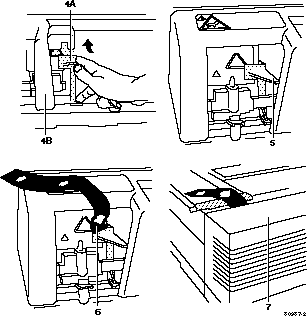
Refer to the drawing on the opposite page while following these steps.
Pull the wire (
A
) to move the printhead (
B
).
Push the tail piece (
A
)
down
and clip the bottom of the shipping block (
B
) to the rail.
Slide the shipping block toward the printhead (
A
). Firmly attach the shipping block to the printhead. Place the shipping block tightly (
B
) against the printhead.
Press the tab (
A
) up, then push the printhead past the post (
B
).
Install the shipping block as shown.
Secure the red label to the shipping block with masking tape.
Close the cover.
Support Home Page
Phaser 300X Support Page
Network Printers Support Home
Additional Information
Register your Printer
ASPs & TPMs
About Software Support
Color Connection
Printer Warranties
Material Safety Data Sheets
Supplies & Cartridge Recycling Program